GPU VRAM Requirements Guide (2026): How Much Do You Need?
Discover how much VRAM you need for AI workloads and training in this comprehensive guide tailored for engineers and developers.
When it comes to GPU workloads, especially in the realm of AI and machine learning, understanding VRAM requirements is crucial. VRAM (Video Random Access Memory) plays a significant role in determining how efficiently your models can be trained and deployed. This guide will help you navigate the VRAM requirements for different AI tasks and provide insights into selecting the right GPU cloud provider for your needs.
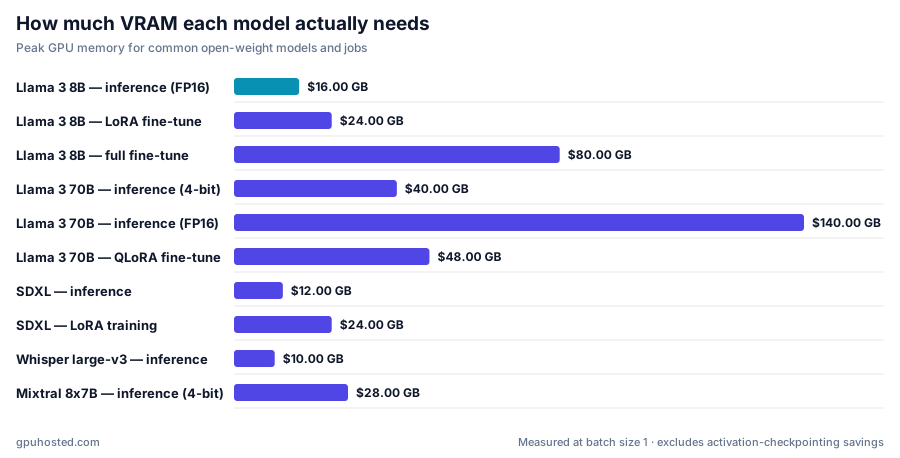
Understanding GPU VRAM
What is VRAM?
VRAM is a type of memory specifically designed for storing image data that a computer’s GPU needs to render graphics. In AI and machine learning, VRAM serves as a temporary storage area for datasets, model parameters, and intermediate computations. Sufficient VRAM allows for larger models and datasets to be processed simultaneously, which can significantly speed up training times and improve performance.
Why VRAM Matters for AI Workloads
For AI engineers, the amount of VRAM available can directly impact model performance and training efficiency. Here are a few reasons why VRAM is critical:
- Model Size: Larger models require more VRAM to store weights and activations.
- Batch Size: Larger batch sizes during training demand more VRAM to hold multiple data samples.
- Data Complexity: High-resolution images or extensive datasets require additional memory for processing.
VRAM Requirements by Use Case
General VRAM Guidelines
| Use Case | VRAM Requirement |
|---|---|
| Basic ML tasks | 4 GB - 8 GB |
| Moderate ML tasks (CNNs) | 8 GB - 16 GB |
| Advanced ML tasks (transformers) | 16 GB - 32 GB |
| Large-scale models | 32 GB and above |
VRAM Requirements for LLMs
When it comes to large language models (LLMs), the VRAM requirements can be substantial. Here’s a breakdown:
- Small LLMs (like distilled models): 8 GB - 16 GB of VRAM may suffice.
- Medium LLMs (like GPT-2): 16 GB - 24 GB is often needed.
- Large LLMs (like GPT-3): 32 GB or more is typically required for training and inference.
Selecting the Right GPU Cloud Provider
Choosing the right GPU cloud provider is essential for meeting your VRAM needs. Here’s a comparison of some popular options:
| Provider | Starting Price | VRAM Options | Details |
|---|---|---|---|
| RunPod | $0.16/h | Up to 48 GB | RunPod offers flexible pricing and a range of GPU options. |
| Lambda Labs | $0.69/h | Up to 32 GB | Lambda Labs is known for its robust infrastructure tailored for AI tasks. |
| Vast.ai | $0.03/h | Up to 96 GB | Vast.ai provides competitive pricing with various GPU configurations. |
| Paperspace | $0.45/h | Up to 24 GB | Paperspace is tailored for developers needing reliable GPU access. |
| CoreWeave | $1.25/h | Up to 80 GB | CoreWeave focuses on enterprise solutions and large-scale workloads. |
| Hetzner GPU | €0.375/h | Up to 24 GB | Hetzner offers affordable options in Europe with solid performance. |
| OVH GPU | €0.4284/h | Up to 32 GB | OVH GPU provides competitive pricing with a focus on European data privacy. |
| Google Cloud GPU | $0.71/h | Varies | Google Cloud offers enterprise-level services with high reliability. |
| AWS GPU (EC2) | $0.53/h | Varies | AWS is known for its extensive services and scalability. |
| Azure GPU | $0.53/h | Varies | Azure provides robust cloud services with GPU capabilities. |
Factors to Consider
- Cost: Evaluate the starting price per hour and any additional costs based on GPU type.
- VRAM Availability: Ensure that the provider offers the right amount of VRAM for your specific needs.
- Geographical Location: For GDPR compliance in Europe, consider providers like Hetzner and OVH.
- Support and Reliability: Look for providers with strong support and reliability records.
Conclusion
Understanding GPU VRAM requirements is fundamental for AI engineers aiming to optimize their workflows. The right amount of VRAM can enhance performance, reduce training times, and enable the use of more complex models. By choosing a suitable GPU cloud provider from the options outlined, you can ensure that your AI projects run efficiently and effectively.
FAQ
How much VRAM do I need for training a small model?
For training a small model, typically, 4 GB to 8 GB of VRAM is sufficient. This range accommodates most basic machine learning tasks and allows for experimentation with simple algorithms. However, if you plan to use more complex datasets or larger batch sizes, you might want to consider GPUs with at least 8 GB of VRAM to avoid any performance bottlenecks.
What is the minimum VRAM required for large language models?
The minimum VRAM required for large language models (LLMs) can vary significantly based on the model’s size. For smaller models, such as distilled versions of larger architectures, 8 GB to 16 GB of VRAM may suffice. However, for training larger models like GPT-3, you would typically need 32 GB or more to handle the model’s parameters and facilitate efficient training and inference.
Can I use a GPU with lower VRAM for my AI workloads?
Yes, you can use a GPU with lower VRAM for your AI workloads, but it may limit your ability to work with larger datasets or models. If the VRAM is insufficient, you might experience slower training times or the inability to run certain models due to memory constraints. For optimal performance, especially with complex tasks, it’s advisable to choose a GPU that meets or exceeds your workload’s VRAM requirements. For a comprehensive comparison of GPU cloud providers, you can visit our full GPU cloud comparison.